
This post is about installing Debian Linux from your hard disk, with the help of your Ubuntu GNU Linux operating system, and without using a USB stick, CDrom, floppy, or any other removable media.
I learned that when I was trying to install Debian on an old computer, I had no other way to run the installation media. My DVD drive was broken, the USB boot didn’t work, and I had no other computer to run a network install.
My only option was to install Debian from Ubuntu. This installation method is called hard disk install.
Instructions to perform a hard disk install are available on the official Debian Installer Manual (Debian Installer Manual’s instructions are not Ubuntu specific, but it does not matter). I would just try to make it a little simpler. Please note that there are many other ways to do this. Reviewing different methods before trying this one will be a good idea.
Important: Please back up all your data before trying this method.
In this example, I was trying to install Debian 7 aka Wheezy, also known as Debian 7, on amd64 architecture.
Update 10-October-2023: I have also tested this method on Ubuntu 22.04 to install Debian 12 (Bookworm).
If you want to install a different architecture, like i386, then you need to browse the same Debian repository to find these files for i386.
You can use this method to install the current stable Debian release or any older release. You will only need to find the right files in the Debian repository.
So for Debian Wheezy on 64bit computers (most modern notebooks and desktop computers are 64bit. If your machine has multi-core processor, then it is 64bit), You need to download:
The first two files will load the Debian installer, and the third file is a CD image or installation media, which will install the rest of the packages during the installation.
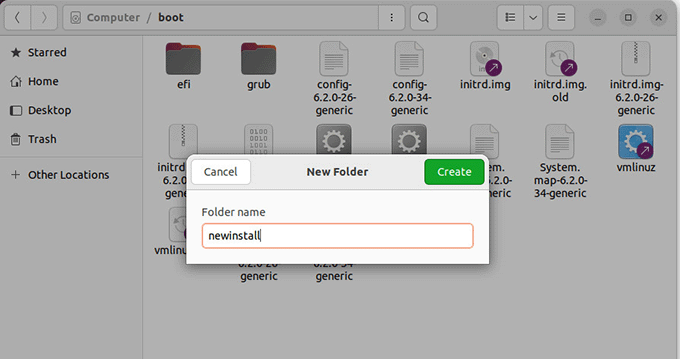
After you have downloaded the files, you will need to place them in the /boot/newinstall directory.
Preparing Boot Loader – Grub2
If you are installing from Ubuntu 9.10 or later versions, you have Grub 2 installed as the default boot loader.
Edit the grub.cfg file located in /boot/grub/ folder.
In the grub.cfg file, you will find a menuentry for your current Linux distro. Below this entry, you will find a line set root=(hd0,msdos1) or something similar.
You need to have that line in the menu entry you are going to paste for the new install. Let’s add a new menu entry to Grub to boot the Debian installer from it.
menuentry 'New Install' {

insmod part_msdos

insmod ext2

set root='(hd0,msdos1)'

linux /boot/newinstall/vmlinuz

initrd /boot/newinstall/initrd.gz

}
Preparing Boot Loader – Grub1 or Grub Legacy
It is highly unlikely that you have Grub1 or Grub legacy installed on your computer. Most modern Linux operating systems now use Grub2.
However, if you still have Grub1 installed, then here is how you will configure it to boot Debian installer
First, open the Grub menu.lst located at /boot/grub/menu.lst with your favorite text editor.
Scroll down until you see something like this:
title		Ubuntu 7.10, kernel 2.6.22-14-generic

root		(hd0,6)

kernel		/boot/vmlinuz-2.6.22-14-generic root=UUID=3599efe8-de32-4c9f-aed1-33c1c61d4bdf ro quiet splash

initrd		/boot/initrd.img-2.6.22-14-generic

quiet
Note the root (hd0,6) line; this is the partition where your Ubuntu is installed. It could be different for you depending on your partition location. And now, we are going to boot Debian Installer from here. Add the following lines to your Grub menu.lst file.
title  New Install
kernel (hd0,6)/boot/newinstall/vmlinuz
initrd (hd0,6)/boot/newinstall/initrd.gz
Now save the file and reboot your computer, and you will see Grub showing you “New Install” as an option in the menu. Select it to boot Debian Installer and install it.
There is a similar way to install Ubuntu from a GNU/Linux-based operating system. You can also Install Ubuntu, Debian, and many other Linux distributions from Windows or any other operating system by using UNetbootin.
To be very honest, I am kind of surprised to find out so many ways to install free open-source operating systems on my computer.
Troubleshooting UEFI and Secure Boot Issues
Most modern laptops come with Windows pre-installed, and the BIOS is set to use Secure Boot using UEFI.
This means your computer may be unable to boot into the Debian installer. You may get the error:
Bad shim signature

You first need to load Linux kernel
The easiest way to fix this is by disabling the secure boot in your computer’s BIOS settings. However, keep in mind that doing so, makes your computer less secure.
I am sure there is a proper way to load the Debian installer with a secure boot. However, I wasn’t able to find the solution. If any one of you knows how to fix this, please feel free to leave a comment below.


Hi,
Thanks for the post. I’m going to install Debian 8 from ubuntu 14.04. It seems that the file “boot.img.gz” is needed in order to boot correctly (without cd-rom detection). So, you need vmlinuz, initrd.gz, boot.img.gz and the iso file.
Bye,
Sponch
Hi Sponch,
Thanks for the update.
hello!
Thanks for your post,
i have try, for information, i’m using ubuntu 14.04 with 640gb, using lvm for partitioning. i want install debian from ubuntu with this trick, boot to iso sucsess after i change “set root=’to my vg id” but problem show up after scanning iso installer, he says installer not detected. I’ve try to shell and cannt mount the lvm partition.
what should i do?
Thanks in advance
Note: if you get an error along the lines of “could not read file. you must load the kernel first.
Remove the /boot/ from the path in the two lines:
linux /boot/newinstall/vmlinuz
initrd /boot/newinstall/initrd.gz
Change to:
linux /newinstall/vmlinuz
initrd /newinstall/initrd.gz
How can I determine the partition location. I tried using Gparted to find out the partition location but it does not give me the detail. Ubuntu on my computer currently loads from (hd0,1) but it does not seem to work.